Citations with NoodleTools
| Site: | Learnbps |
| Class: | Moodle Template Exchange |
| Book: | Citations with NoodleTools |
| Printed by: | Guest user |
| Date: | Monday, March 23, 2026, 10:17 PM |
Table of contents
- 1. Tips for accessing an article from a database from NoodleTools or Google Docs
- 1.1. Copy the URL to the clipboard
- 1.2. Locating the document URL in Opposing Viewpoints
- 1.3. Create a citation in NoodleTools
- 1.4. Select the type of source you are citing
- 1.5. Paste the URL into the citation
- 1.6. Submit your citation
- 1.7. Acessing your article from NoodleTools.
- 1.8. Using Points of View Reference Center and finding your URL
- 1.9. Copy the URL to the Clipboard
- 1.10. Paste the URL into the appropriate box
- 1.11. Click "View live Web page" to access your article
- 1.12. Copying the URL from Opposing Viewpoints into Google Docs
- 1.13. Pasting your citation into Google Docs
- 1.14. Highlight and copy the Document URL
- 1.15. Paste the URL into Google Docs
- 1.16. Click on the created link to open your article.
- 1.17. Locating the source citation in Points of View Resource Center
- 1.18. Change the citation format
- 1.19. Cancel the print option
- 1.20. Copy the source to the clipboard
- 1.21. Paste the source citation into you Google Doc
- 1.22. Click on the "PDF Full Text"
- 1.23. Highlight and copy the URL
- 1.24. Paste the URL into Google Docs
- 1.25. Click on the created link to open the article
- 1.26. Betat Site
- 2. NoodleTools Guides
- 2.1. Newspaper Article Step 1
- 2.2. Newspaper Article Step 2
- 2.3. Newspaper Article Step 3
- 2.4. Final Citation
- 2.5. Citing an Opposing Viewpoints Database Journal Article Reprinted in an Anthology Part 1
- 2.6. Citing an Opposing Viewpoints Database Journal Article Reprinted from An Anthology Part2
- 2.7. Citing an academic journal
- 2.8. Citing a magazine accessed from a database
- 2.9. Citing a Literary Journal
- 2.10. Citing a Book accessed from a database
- 2.11. Citing a website from netTrekker
- 2.12. Citing a literary criticism from a book accessed from a database
- 2.13. Citing a chapter from a book accessed from a database
1. Tips for accessing an article from a database from NoodleTools or Google Docs
If you are having trouble accessing your database articles from NoodleTools or Google Docs, here are some tips and step-by-step instructions to help you.
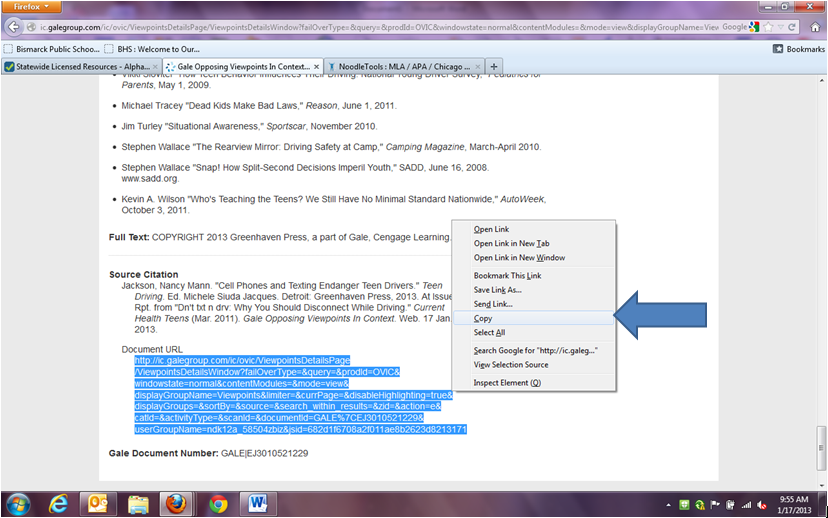
1.1. Copy the URL to the clipboard
Highlight the entire web address and copy it to the clipboard
1.2. Locating the document URL in Opposing Viewpoints
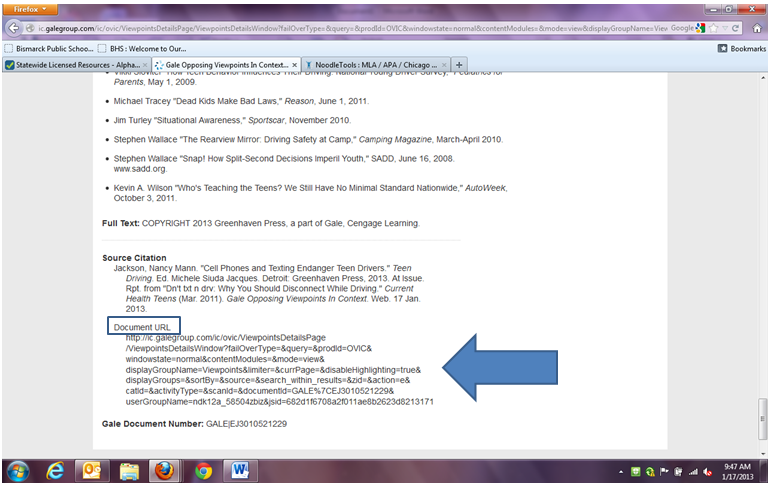
If you do not want to print out your sources from our online databases, but still be able to access them later from your NoodleTools page, here are step by step instructions:
If using Opposing Viewpoints, once you have found your article scroll all the way to the bottom to find the “Document URL”


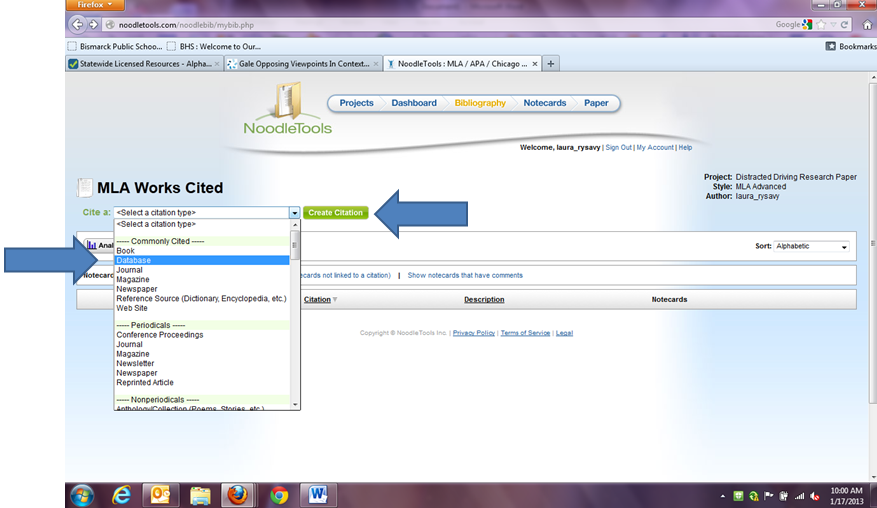
1.3. Create a citation in NoodleTools
In NoodleTools, in your Bibliography section, select cite a database from the pull-down list and click “Create Citation”
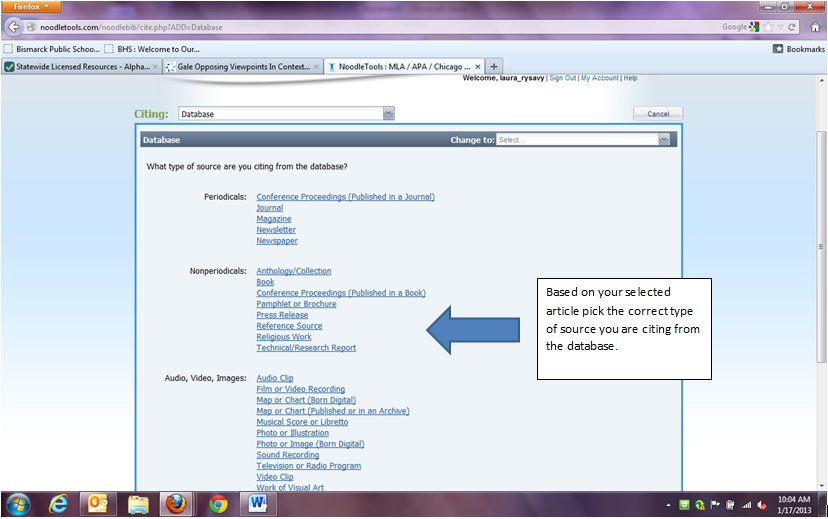
1.4. Select the type of source you are citing
Select the correct type of source you are citing based on your article
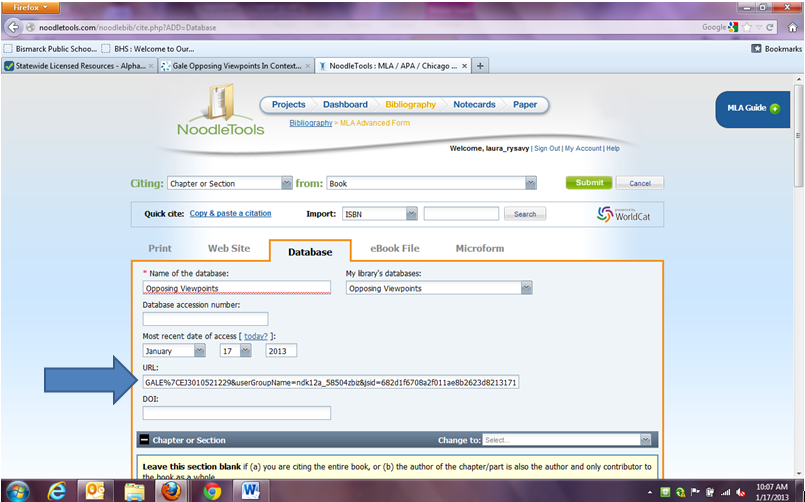
1.5. Paste the URL into the citation
Next, when filling in your source information paste the URL into the appropriate box. While this is not required for MLA citations this is how you will be able to access your information later online.
1.6. Submit your citation
Finish filling in the rest of the information for your article and then click “Submit” at the bottom of the page

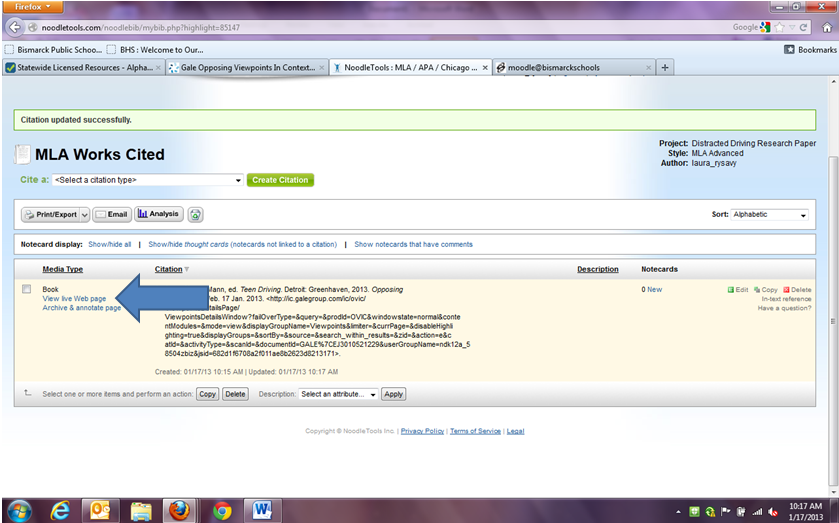
1.7. Acessing your article from NoodleTools.
Now if you need to access your article at any time click on “View live Web page” and your article will open in a new window.
1.8. Using Points of View Reference Center and finding your URL
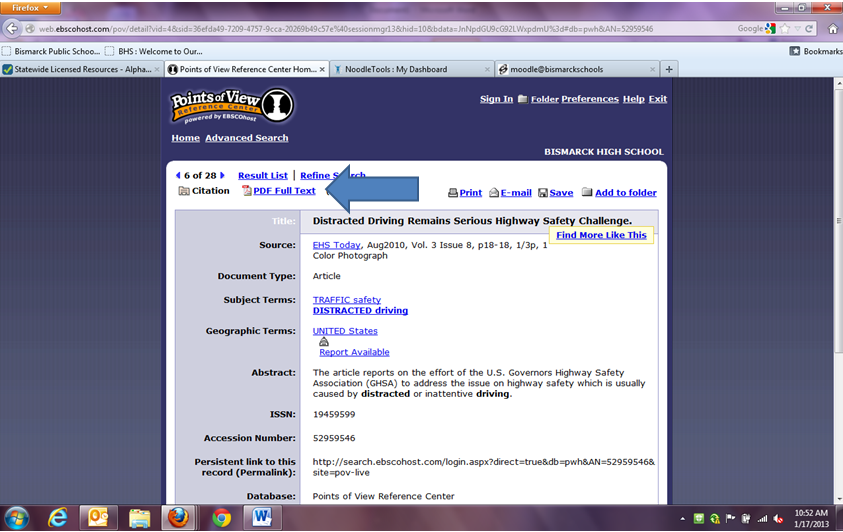
If you are using the Points of View Reference Center please follow these steps. After you have found your article click on “PDF Full Text”
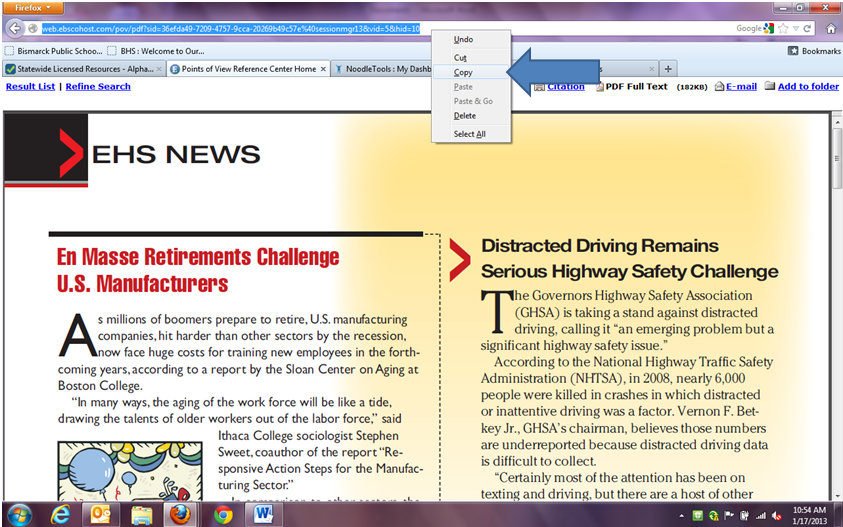
1.9. Copy the URL to the Clipboard
Highlight and copy the URL from the address bar at the top of the screen.
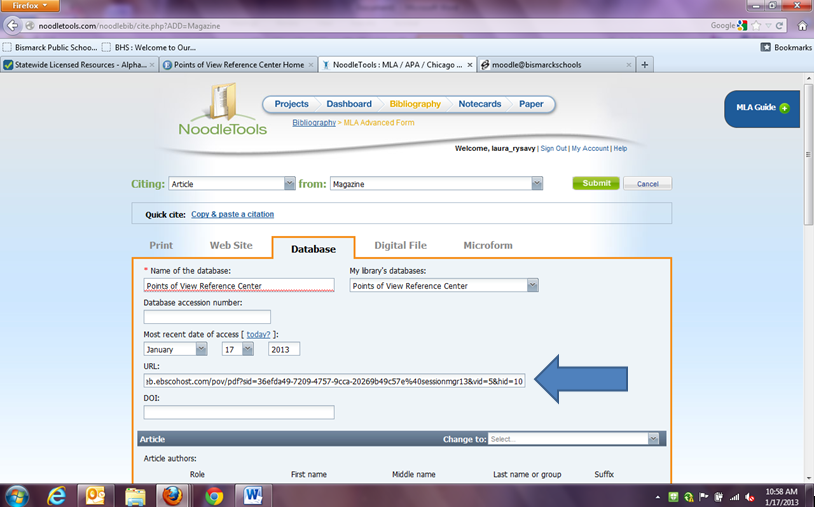
1.10. Paste the URL into the appropriate box
Back in NoodleTools, when citing this reference select “database” and corresponding source type. When filling in the information paste the URL into the appropriate box. Finish filling in the citation information and click Submit.
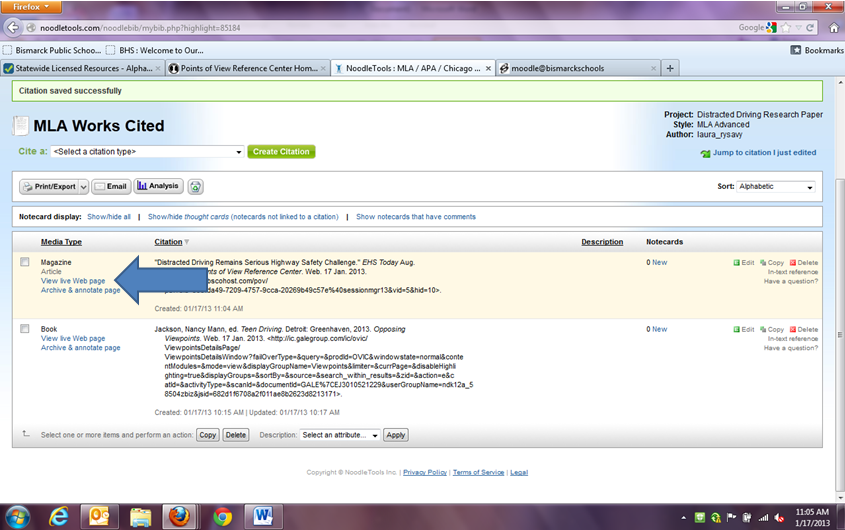
1.11. Click "View live Web page" to access your article
Now if you need to access your article at any time click on “View live Web page” and your article will open in a new window.
1.12. Copying the URL from Opposing Viewpoints into Google Docs
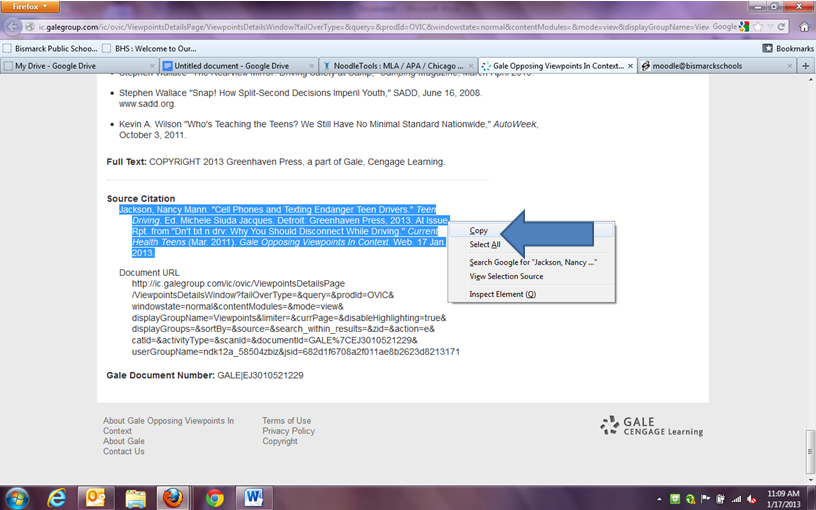
If you want to copy and paste the citation directly into Google Docs scroll to the bottom of the article and copy the citation. We recommend using Ctrl+C, this helps keep the formatting when pasting into Google Docs.
1.13. Pasting your citation into Google Docs
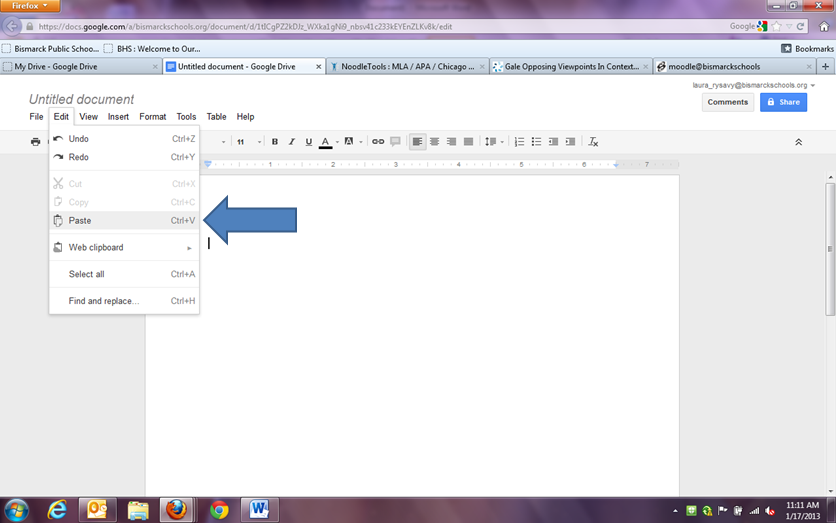
To paste the citation into Google Docs using Ctrl+V is recommend, however you can use the paste key under Edit.
1.14. Highlight and copy the Document URL
Next, back in your article, highlight and copy - Ctrl+C - the URL from the bottom of the screen. It will be listed after “Document URL”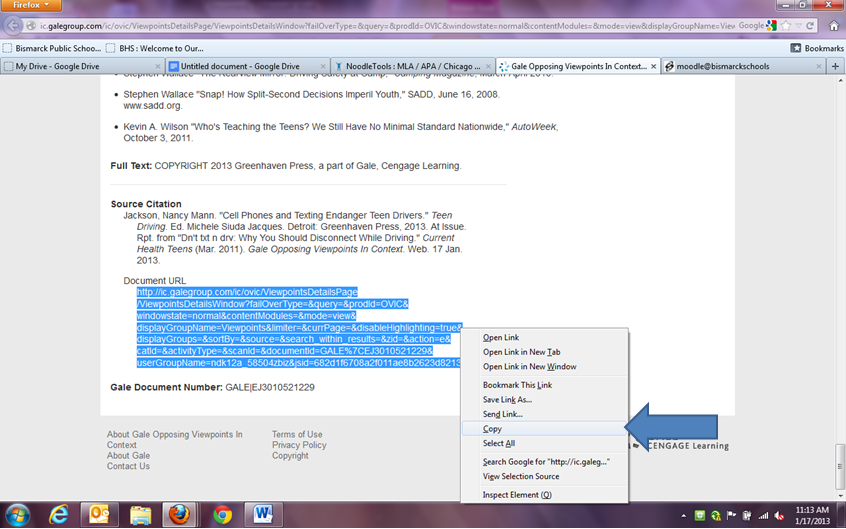
1.15. Paste the URL into Google Docs
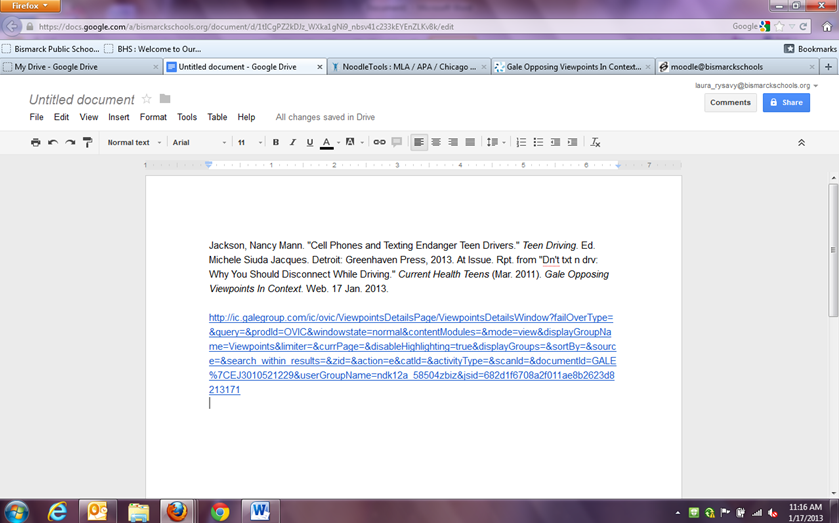
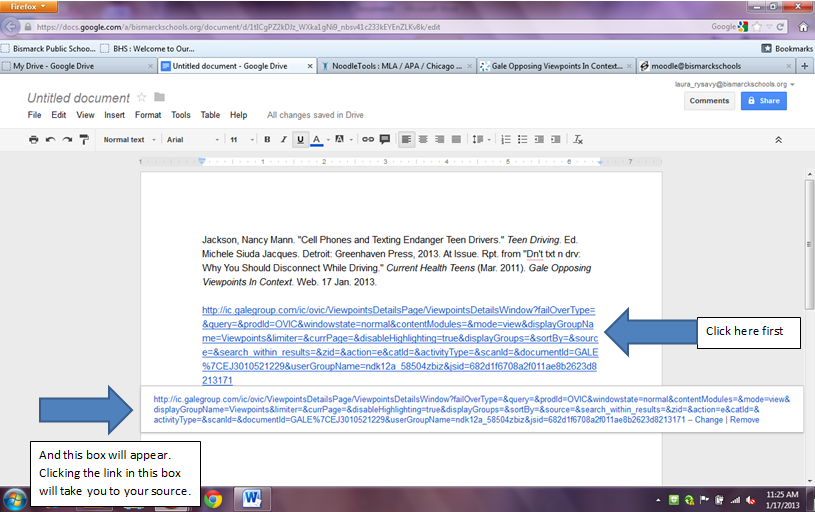
Back in Google Docs paste – Ctrl+V - the URL into the document and hit enter. The text should change from black to blue in color.
1.16. Click on the created link to open your article.
Move your cursor over the blue text and click. A box will appear with the link inside it. If you click the link within the box it will open your original article in a second widow.
1.17. Locating the source citation in Points of View Resource Center
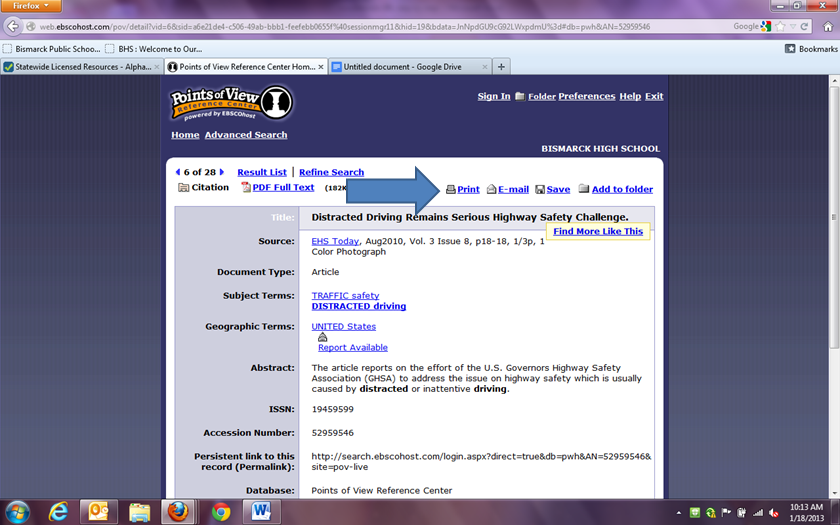
If you want to use Google Docs and Points of View Resource Center, to find the article’s source click on “Print”
1.18. Change the citation format
Click the dot next to “Citation Format” and then select MLA from the drop down menu. After you have selected MLA, click “Print”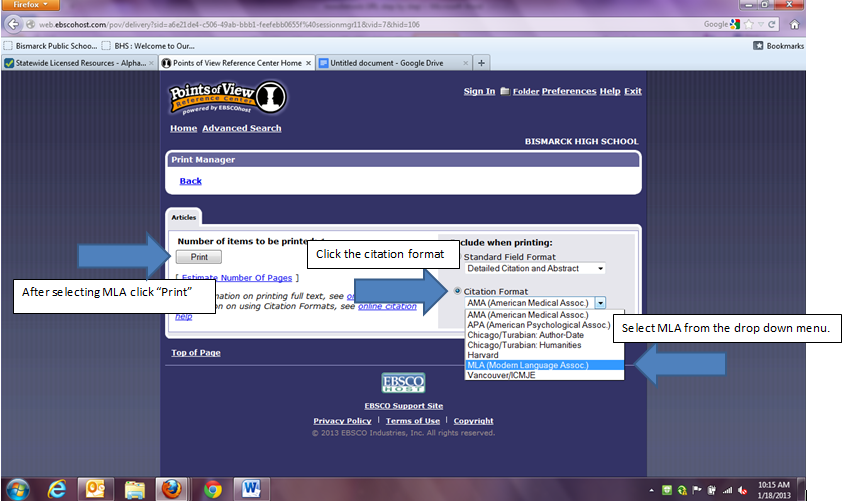
1.19. Cancel the print option
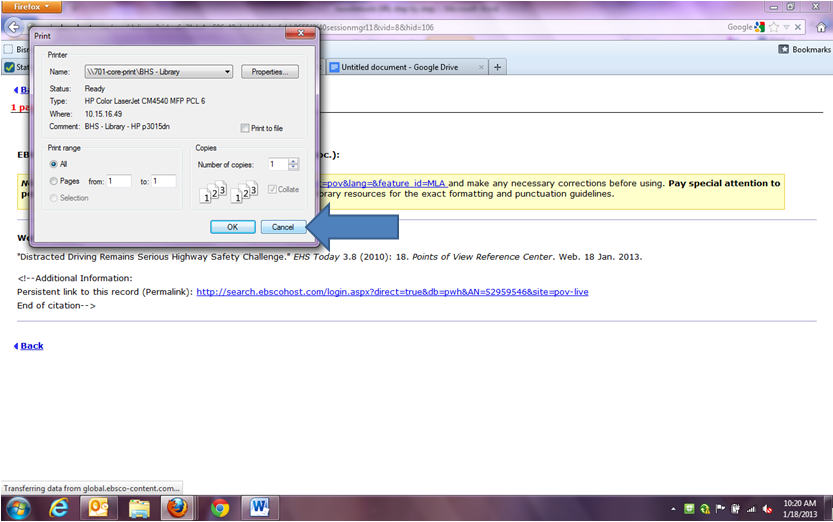
After clicking print, it will take you to a new page and a “print” box will appear. Click “Cancel” to cancel printing.
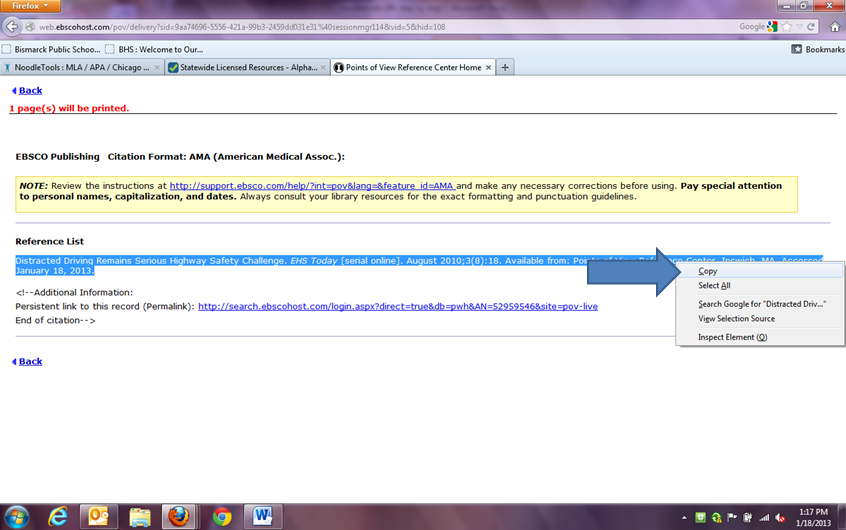
1.20. Copy the source to the clipboard
Highlight your source, listed underneath “Reference List” and copy – Ctrl+C – to copy it to the clipboard.
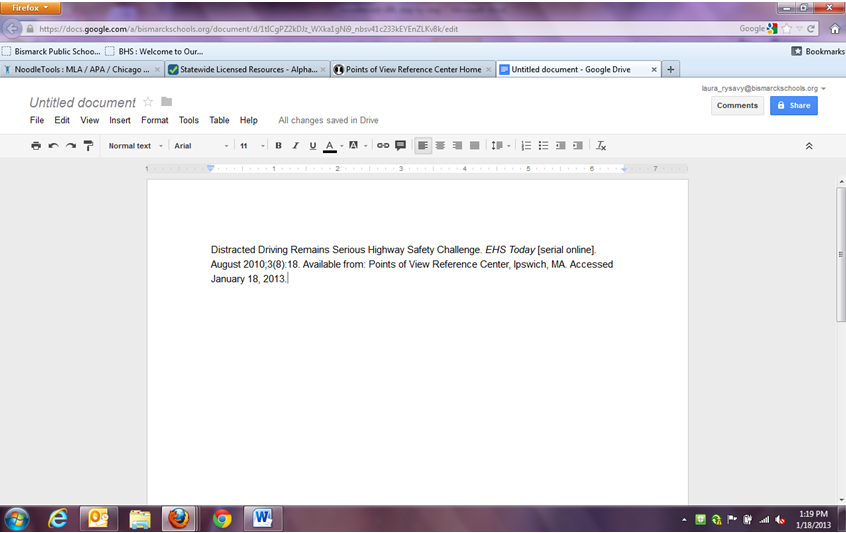
1.21. Paste the source citation into you Google Doc
Next, in Google Docs, paste the source into your document (Ctrl+V)
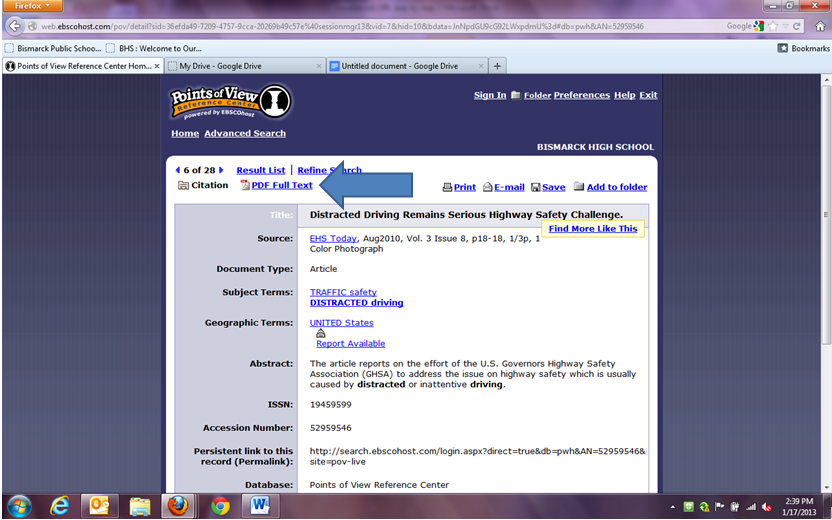
1.22. Click on the "PDF Full Text"
Click on the “PDF Full Text” link
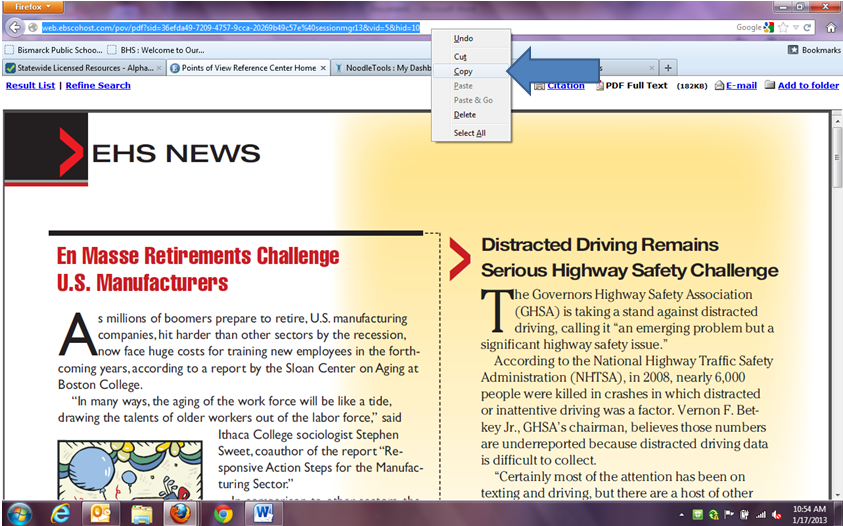
1.23. Highlight and copy the URL
Highlight and copy the URL from the address bar at the top of the screen.
1.24. Paste the URL into Google Docs
In Google Docs paste (Ctrl+V) the URL into the document and hit enter. The text should change from black to blue in color.
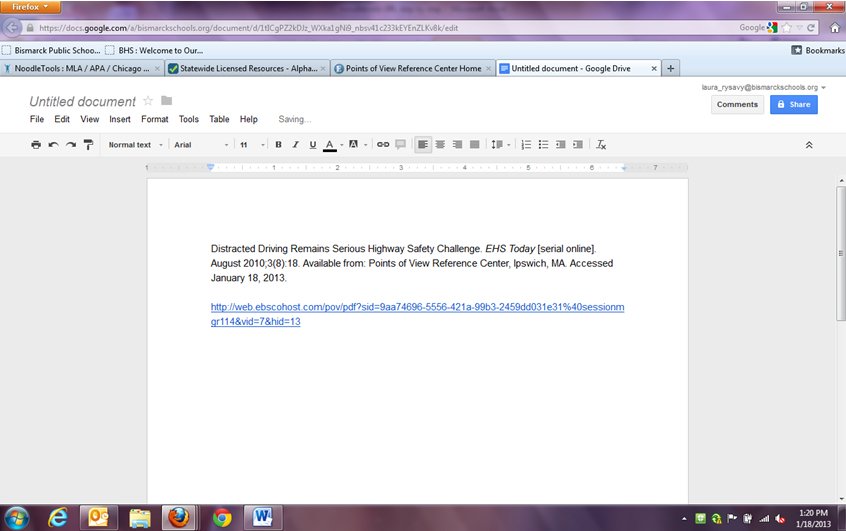
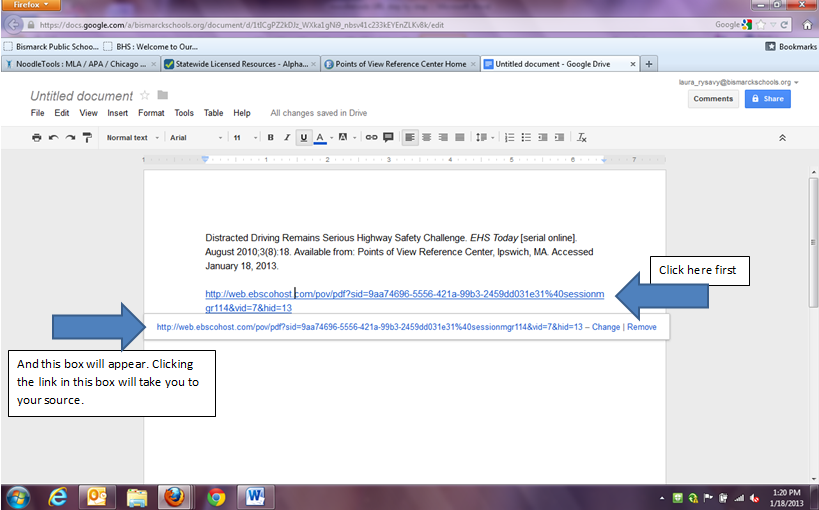
1.25. Click on the created link to open the article
Move your cursor over the blue text and click. A box will appear with the link inside it. If you click the link within the box it will open your original article in a second widow.
1.26. Betat Site
This is a test.
2. NoodleTools Guides
How-to Examples of Specific Citations created within NoodleTools
The following NoodleTools Chapter will give you specific citation guides to the most commonly cited sources.
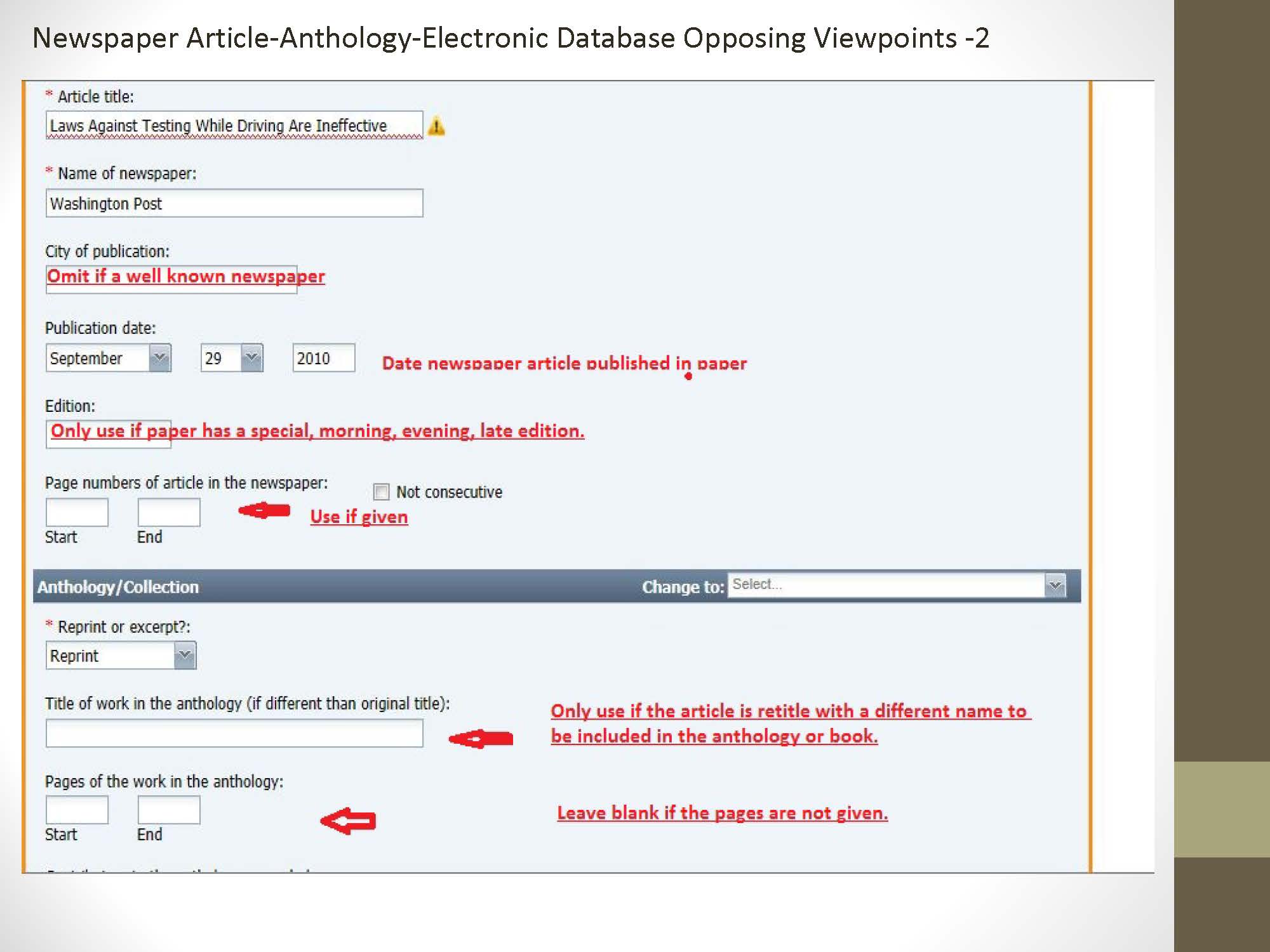
2.1. Newspaper Article Step 1
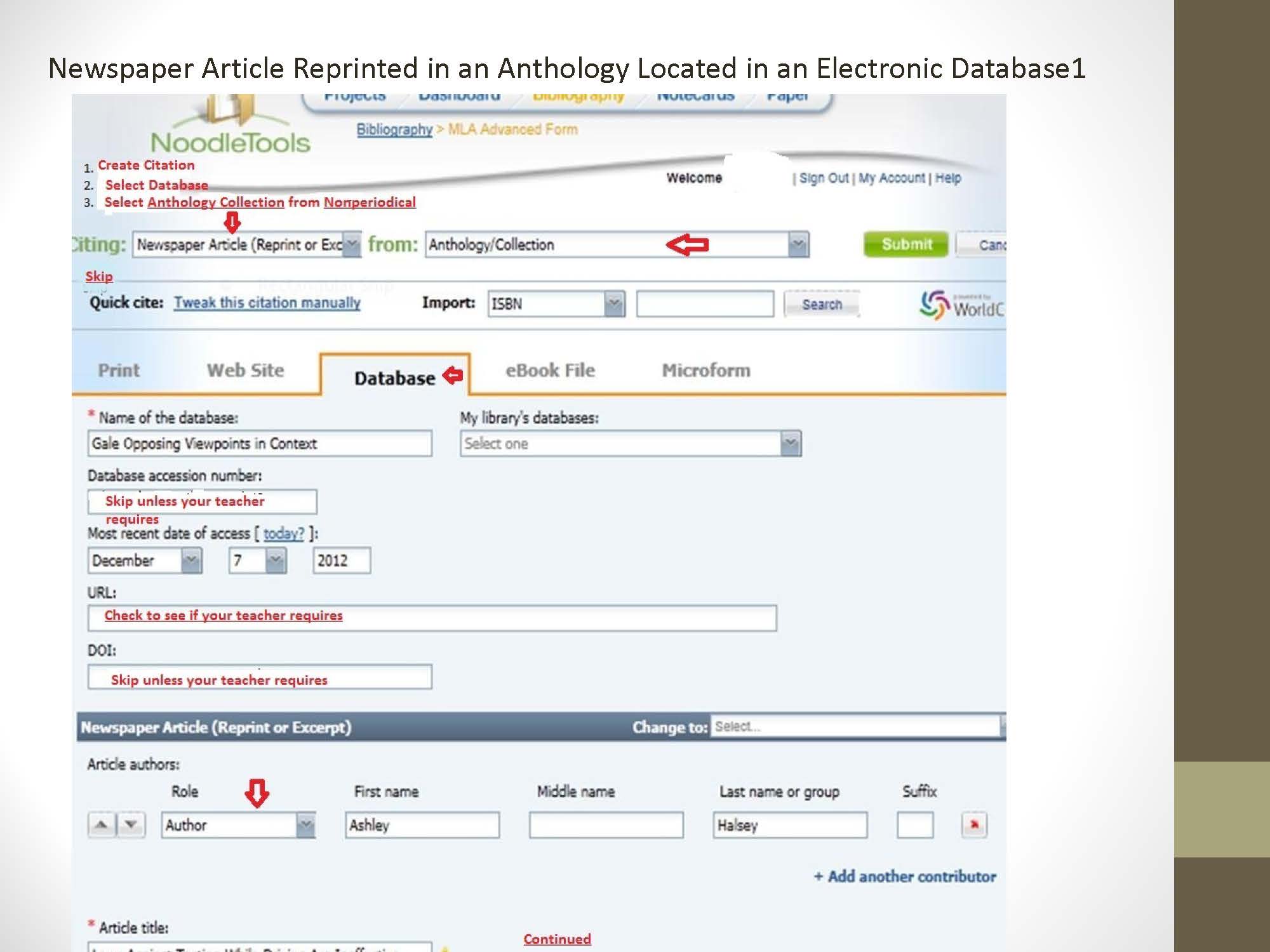
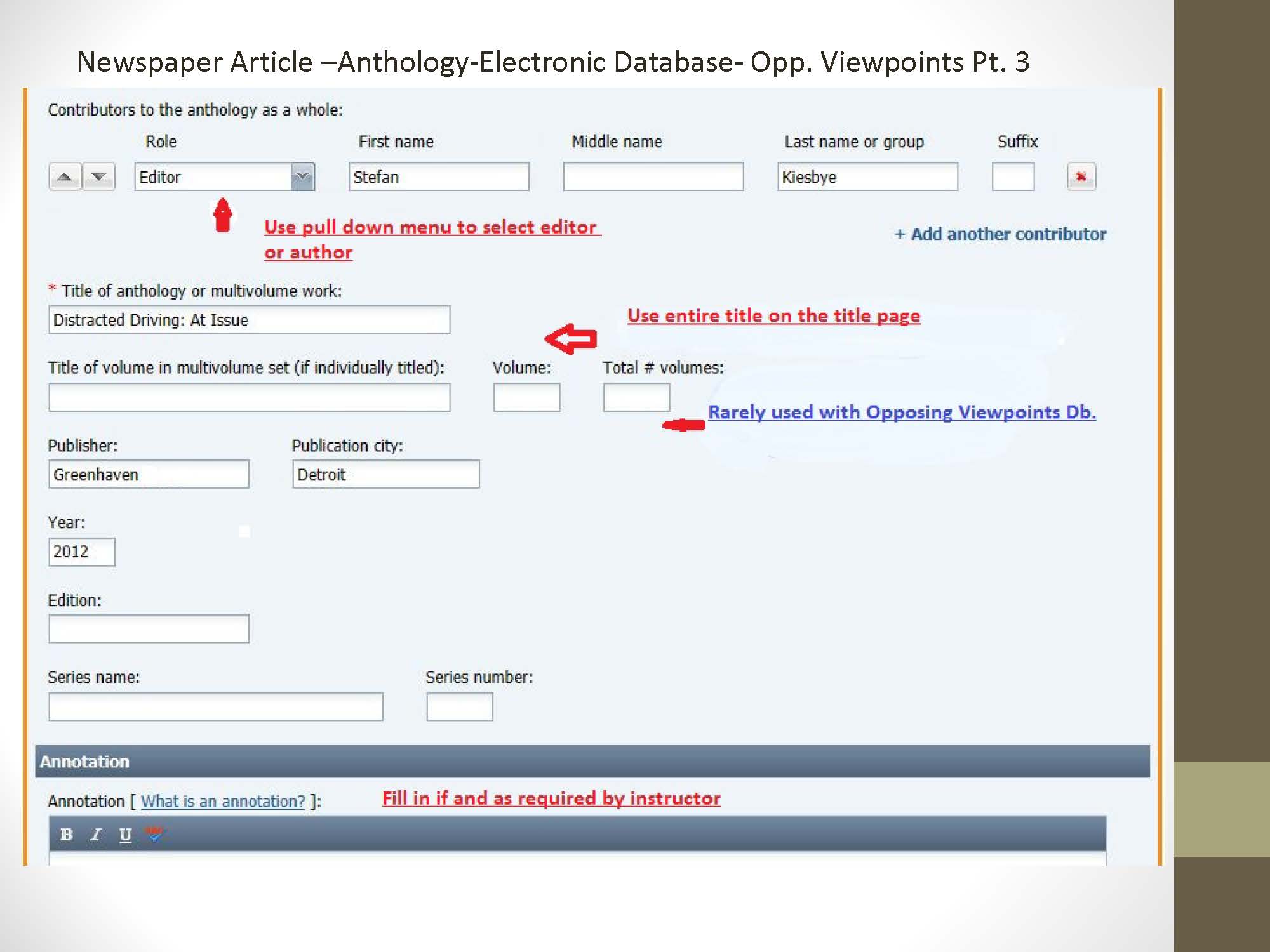
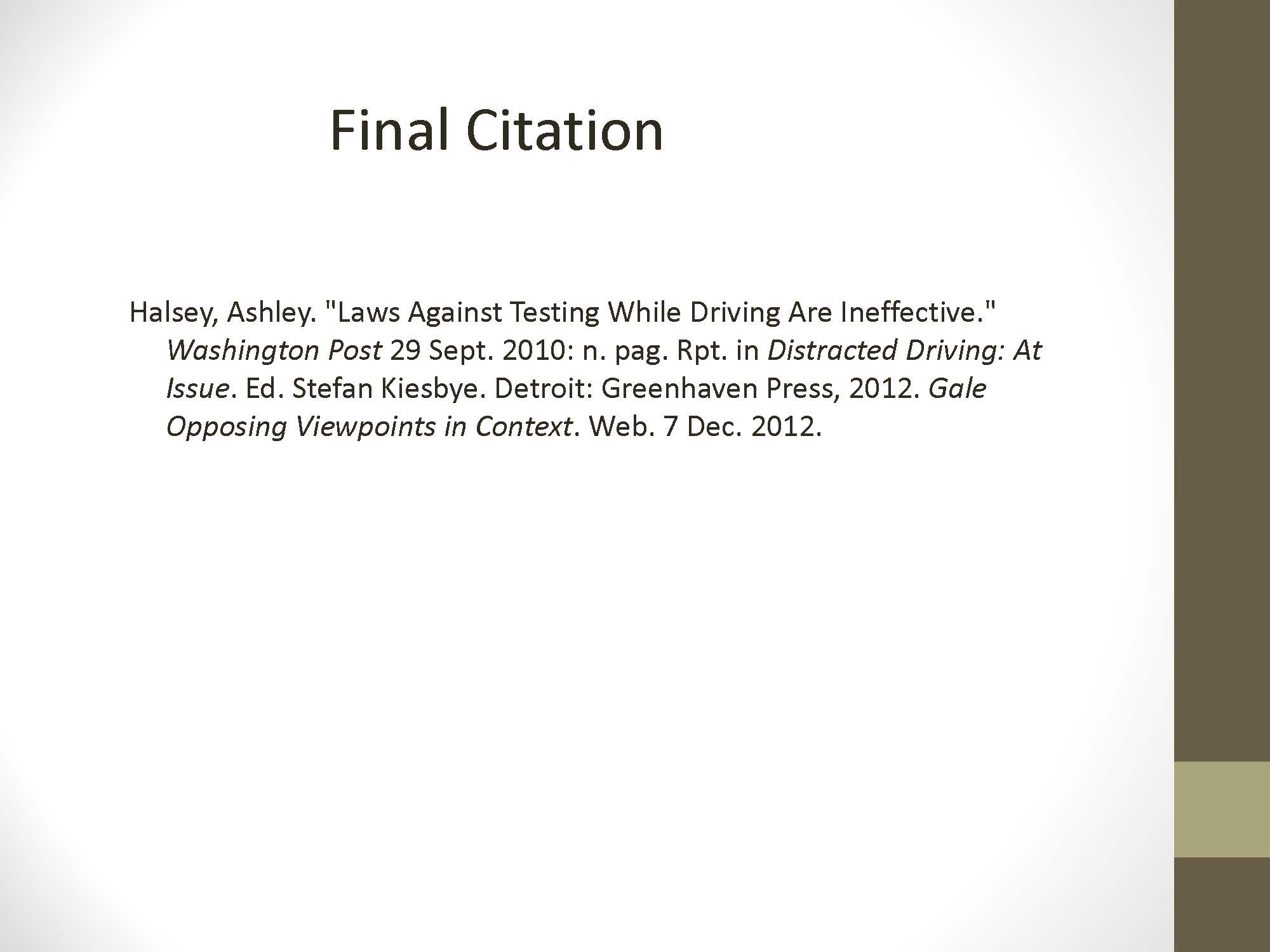
Newspaper Article Reprinted in an Anthology located in an Electronic Database
2.2. Newspaper Article Step 2
2.3. Newspaper Article Step 3
2.4. Final Citation
Final Citation
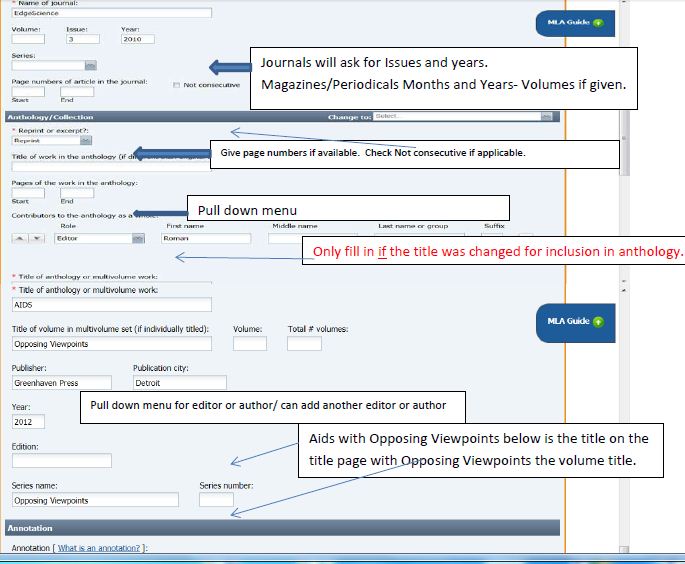
2.5. Citing an Opposing Viewpoints Database Journal Article Reprinted in an Anthology Part 1
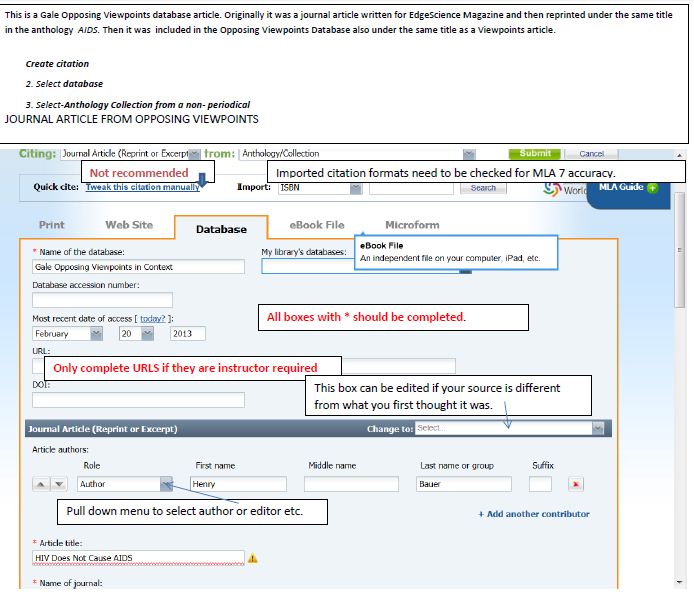
2.6. Citing an Opposing Viewpoints Database Journal Article Reprinted from An Anthology Part2
2.7. Citing an academic journal
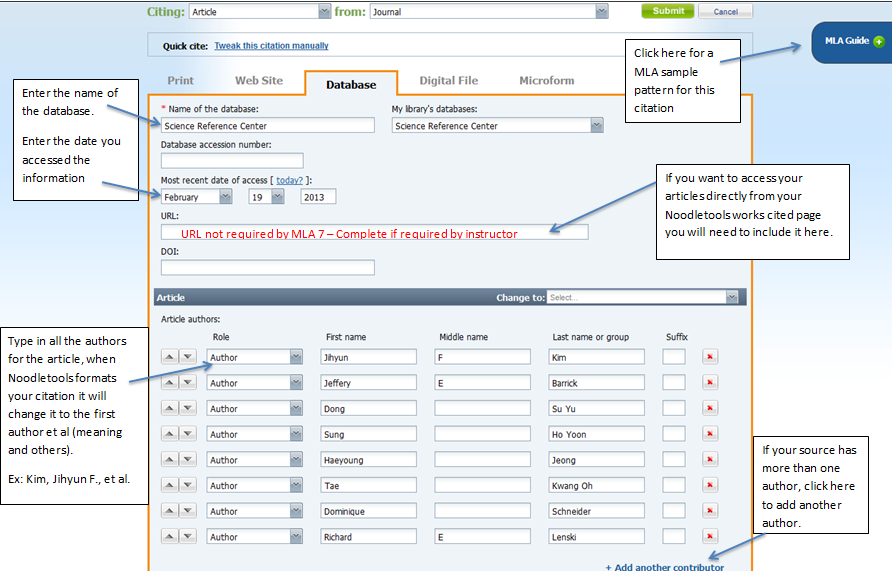
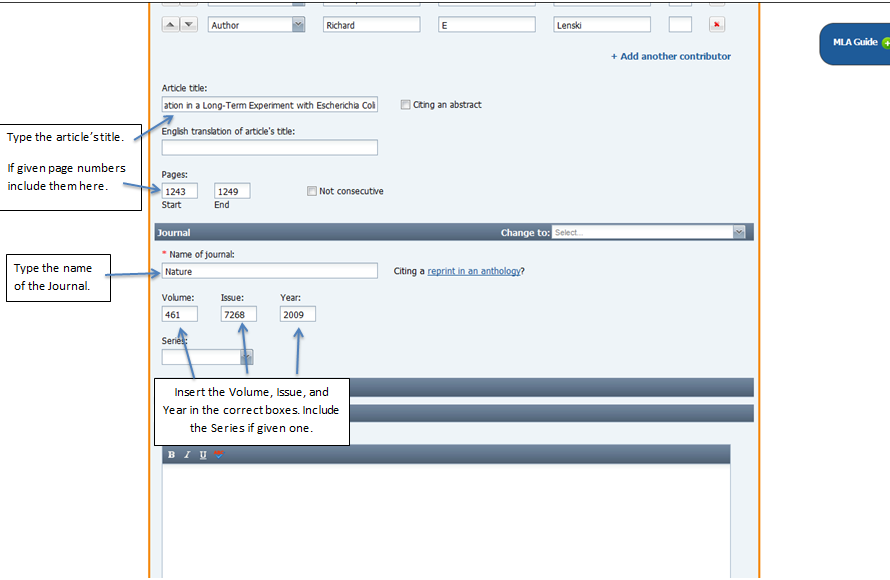
Citing an academic journal article accessed from a database.
Note: Journal articles contain original research and have a volume/issue number.
This is the proposed database citation for this entry:
Jihyun F. Kim, et al. "Genome Evolution And Adaptation In A Long-Term Experiment With Escherichia Coli." Nature 461.7268 (2009): 1243. Science Reference Center. Web. 19 Feb. 2013.
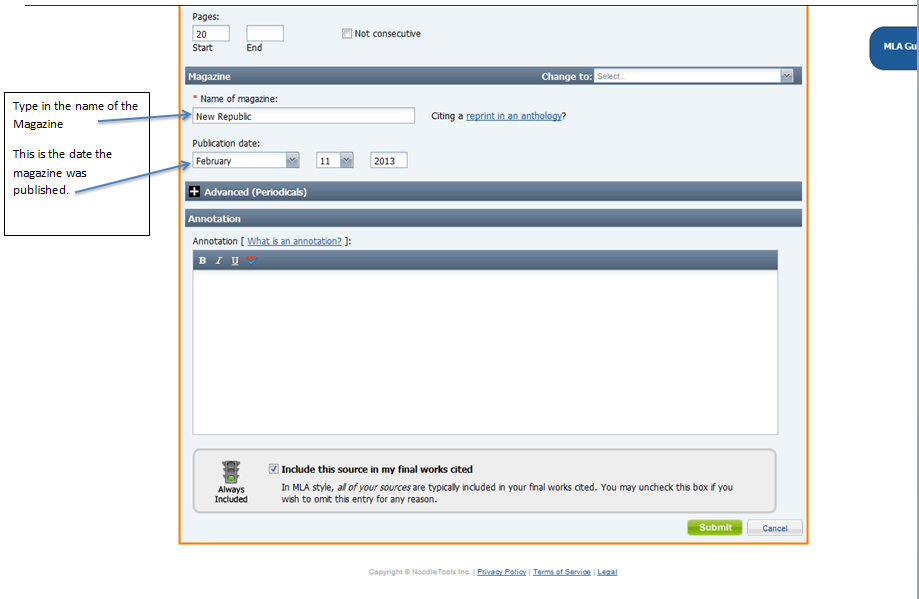
2.8. Citing a magazine accessed from a database
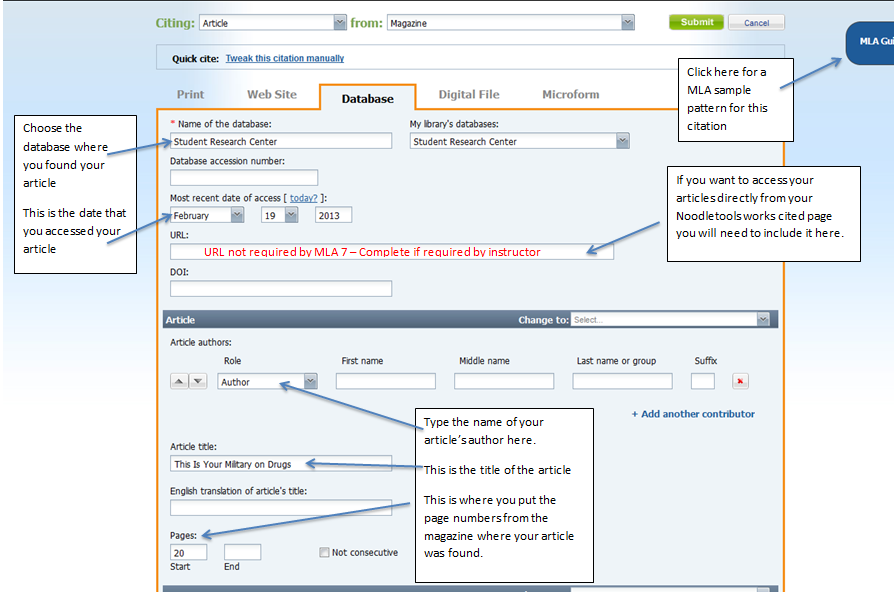
Citing a magazine accessed from a database.
This is the proposed database citation for this entry:
"This Is Your Military On Drugs." New Republic 244.1 (2013): 20. MAS Ultra - School Edition. Web. 19 Feb. 2013.
2.9. Citing a Literary Journal
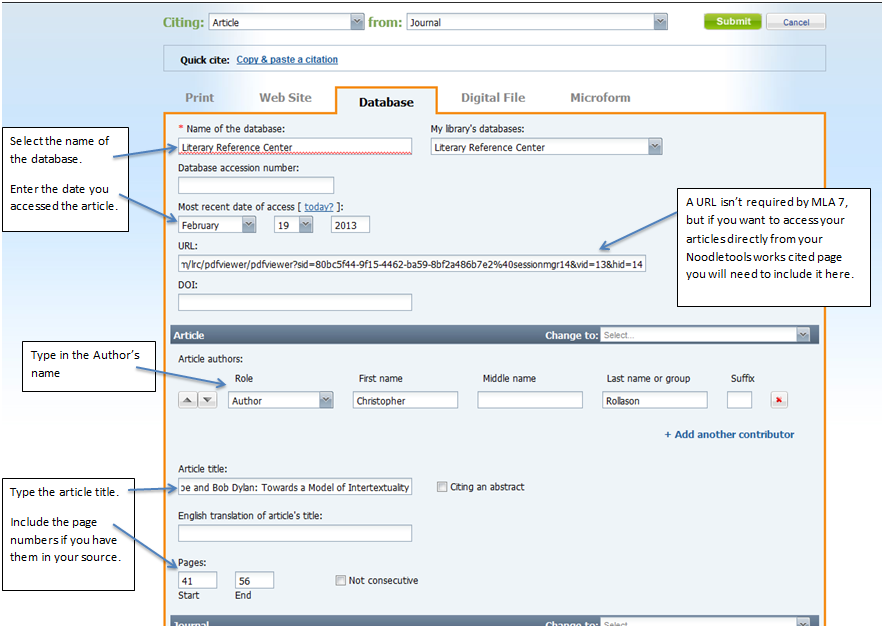
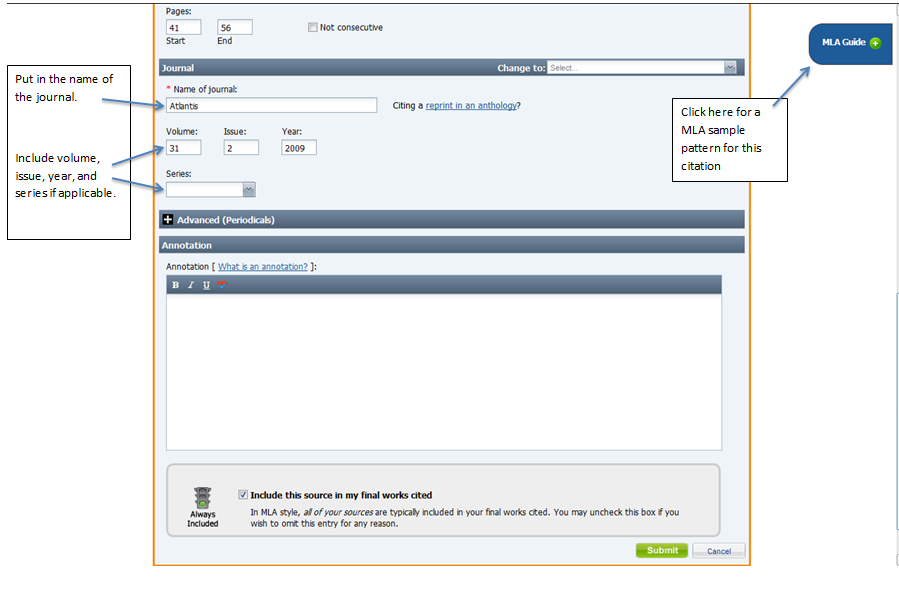
Citing an academic journal article accessed from a database.
Note: Journal articles contain original research and have a volume/issue number.
This is the proposed database citation for this entry:
Rollason, Christopher. "Tell-Tale Signs - Edgar Allan Poe And Bob Dylan: Towards A Model Of Intertextuality." Atlantis (0210-6124) 31.2 (2009): 41-56. Literary Reference Center. Web. 19 Feb. 2013.
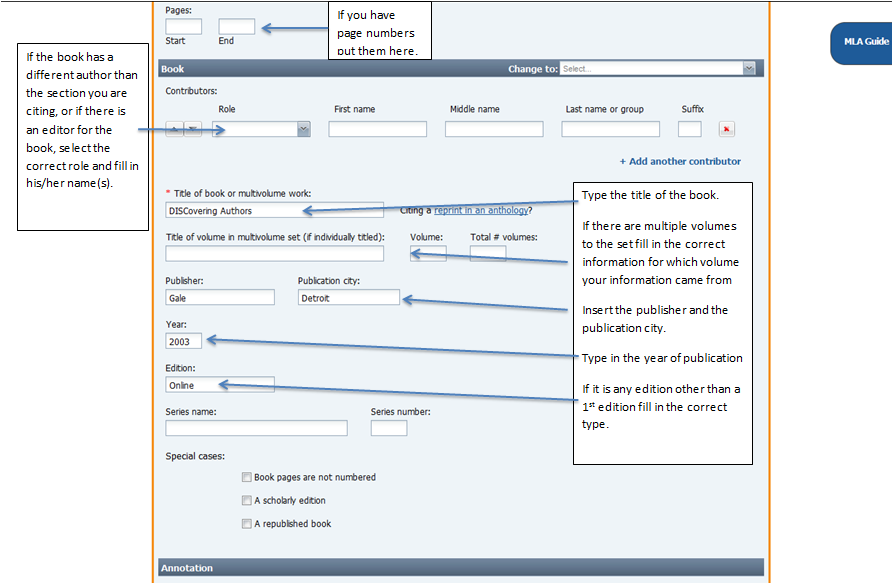
2.10. Citing a Book accessed from a database
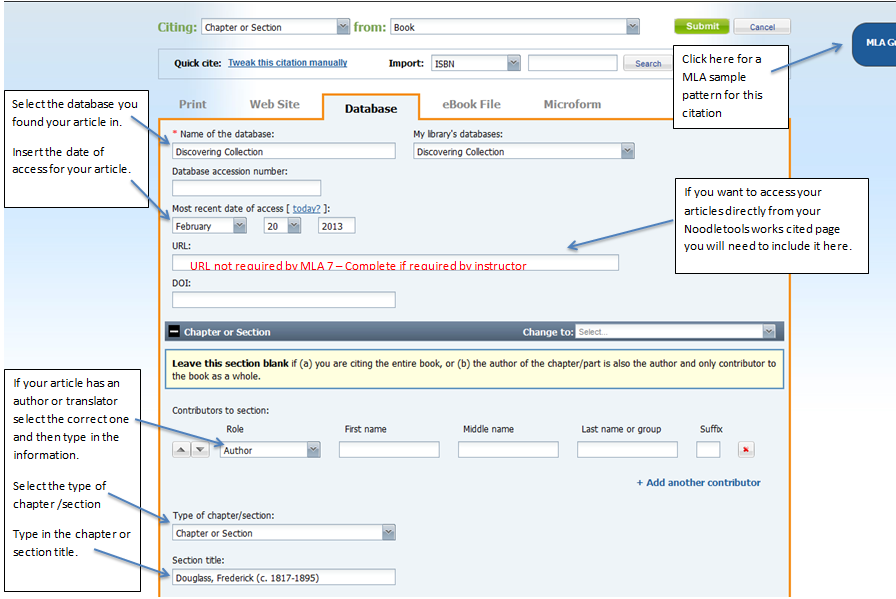
Citing a book accessed from a database.
Note: depending on the database, these are named differently – for example: Reference, Points of View, books, etc.
This is the proposed database citation for this entry:
"Douglass, Frederick (c. 1817-1895)." DISCovering Authors. Online ed. Detroit: Gale, 2003. Discovering Collection. Gale. Bismarck Public Schools. 20 Feb. 2013 <http://find.galegroup.com/srcx/infomark.do?&source=gale&srcprod=DISC&userGroupName=ndk12a_58504zbiz&prodId=DC&tabID=T001&docId=EJ2101101182&type=retrieve&contentSet=GSRC&version=1.0>.
2.11. Citing a website from netTrekker
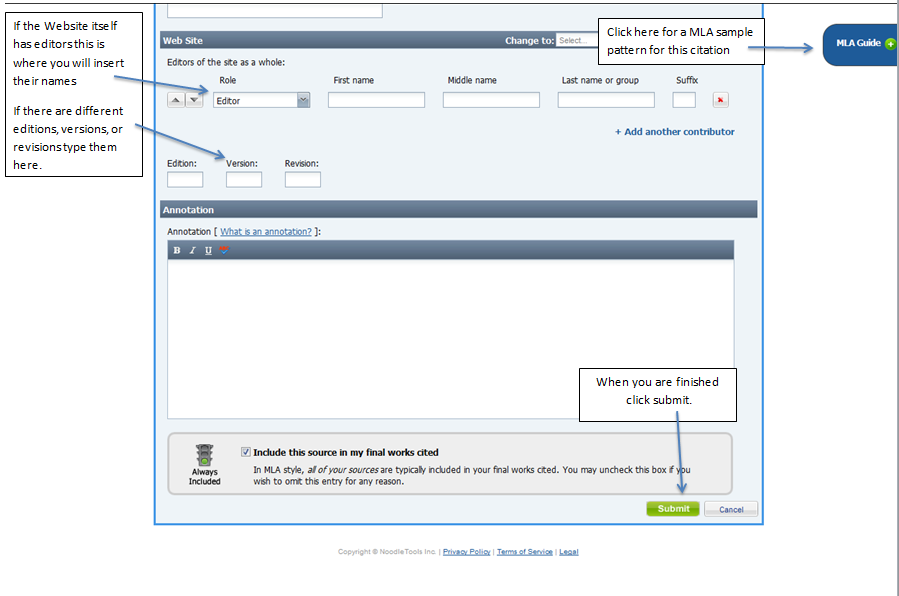
Citing a website.
When using the netTrekker database you will cite your source as a website.
This is the proposed database citation for this entry:
Author(s). "Title of Article/Page." Other Contributor(s). Name of Web Site. Site Publisher/Sponsor, Date of E-Publication. Web. Date of Access. <Optional URL>.

2.12. Citing a literary criticism from a book accessed from a database
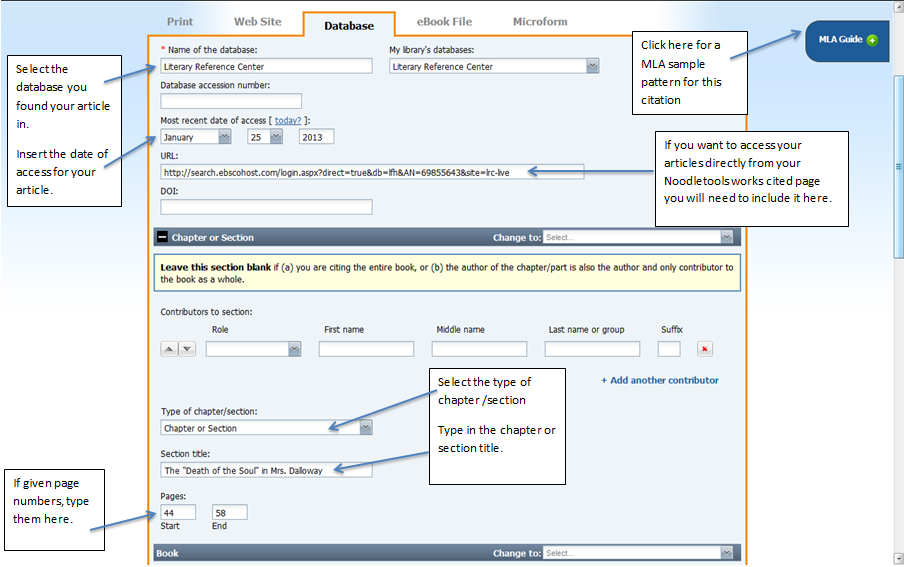
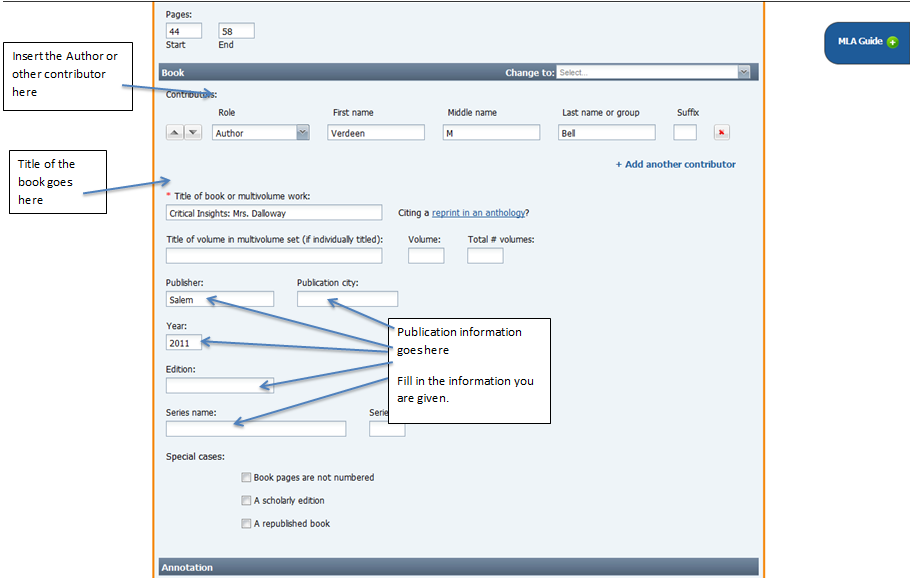
Citing a literary criticism from a book accessed from a database.
Note: depending on the database, these are named differently – for example: Reference, Points of View, books, etc.
This is the proposed database citation for this entry:
Bell, Vereen M. "The "Death Of The Soul" In Mrs. Dalloway." Critical Insights: Mrs. Dalloway (2011): 44-58. Literary Reference Center. Web. 26 Mar. 2013.
2.13. Citing a chapter from a book accessed from a database
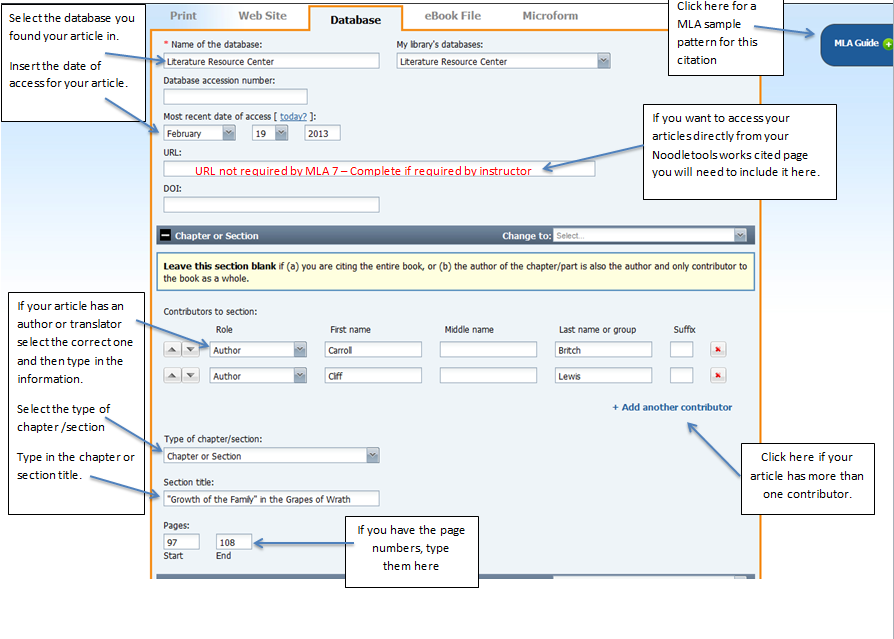
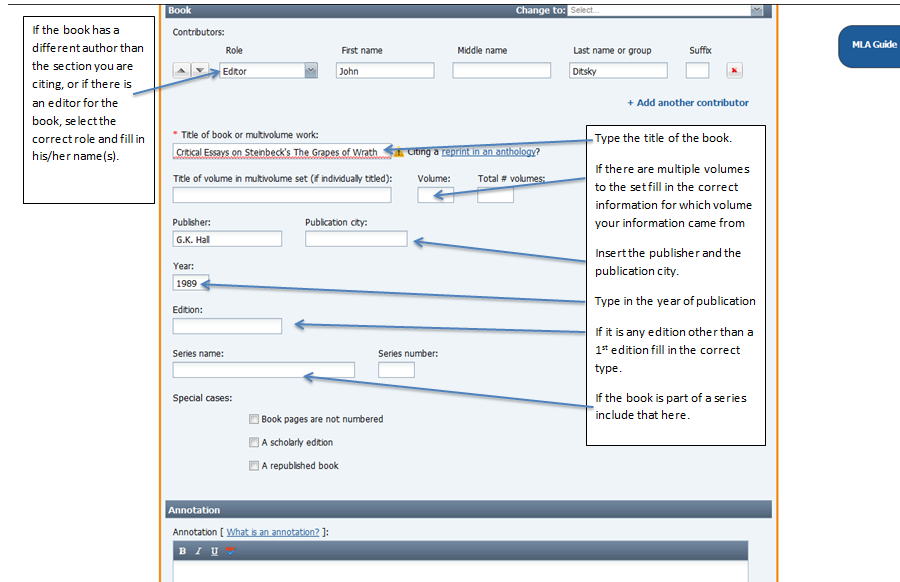
Citing a chapter from a book accessed from a database.
Note: depending on the database, these are named differently – for example: Reference, Points of View, books, etc.
This is the proposed database citation for this entry:
Carroll Britch and Cliff Lewis, “Growth of the Family in The Grapes of Wrath,” in Critical Essays on Steinbeck’s The Grapes of Wrath, edited by John Ditsky, G.K. Hall, 1989, pp. 97-108.